
How to Pay for Work Permit Online in Jordan: Step-by-Step Guide
Work permits in Jordan are essential for regulating foreign labor and ensuring legal compliance, making work permit payments one of the most important official transactions in the country. Combined with the local digital transformation and the organizational efforts in streamlining administrative requirements, companies and individuals have become more reliant on digital solutions to complete payments and carry out procedures.
That being said, how can you settle work permit payments online? Our comprehensive guide shows you how to pay for work permits online in Jordan step-by-step, in addition to the renewal process and more relevant details and key considerations, helping you pay work permit fees easily, efficiently, and safely with just a few clicks.
The Required Documents for Issuing or Renewing Work Permits in Jordan
While the documents required for work permits vary depending on the sector and the specific permit type, certain documents are required in all cases, and they are as follows:
- Passport: A copy of the worker’s passport (must be valid).
- Employment Contract: Copies of a signed employment contract. Must be certified and approved by the Ministry of Labor.
- Passport Photos: Two recent passport-sized photos of the worker.
- Employer Identification Documents: A copy of the employer's ID, commercial registration certificate, or business license.
- Medical Examination Certificate: A valid medical examination certificate, issued by an officially approved health center. This document is sometimes verified electronically.
- Previous Work Permit and Residence Permit: A copy of the last work permit and residence permit in case of applying for renewal.
Since these are only the essential documents, further credentials and paperwork could be required depending on your sector and the business activity. As such, it is always advisable to confirm the exact requirements before beginning your work permit payment process online.
Click here for more detailed information about the needed documents.
Online Work Permit Payment: How to Pay Work Permit Fees in Jordan through eFAWATEERcom
eFAWATEERcom streamlines online work permit payments, allowing residents to easily fulfill this financial obligation from anywhere and at any time, as they do not have to handle paperwork and formalities in person.
Here is how to pay for work permits online through eFAWATEERcom’s portal step by step:
1-Access the portal and create an account
First, access eFAWATEERcom’s portal or mobile application through Google Play or the App Store. If this is your first time using our service, create an account by entering some basic information, like your phone number, email address, and password. This will take a few moments. If you already have an account, you can sign in immediately.
2- Sign in to your account
If you are a returning user, sign into your account by entering your credentials. The home page displays a variety of options for the available online bill payment services, such as online work permit fee payments.
3- Select the biller (service provider)
To pay work permit fees in Jordan through eFAWATEERcom, go to the "Services" section in the menu on the left. A list of billers will be displayed by category. Select the “Government Service” option, which encompasses all governmental authorities that are part of our comprehensive billers’ network. 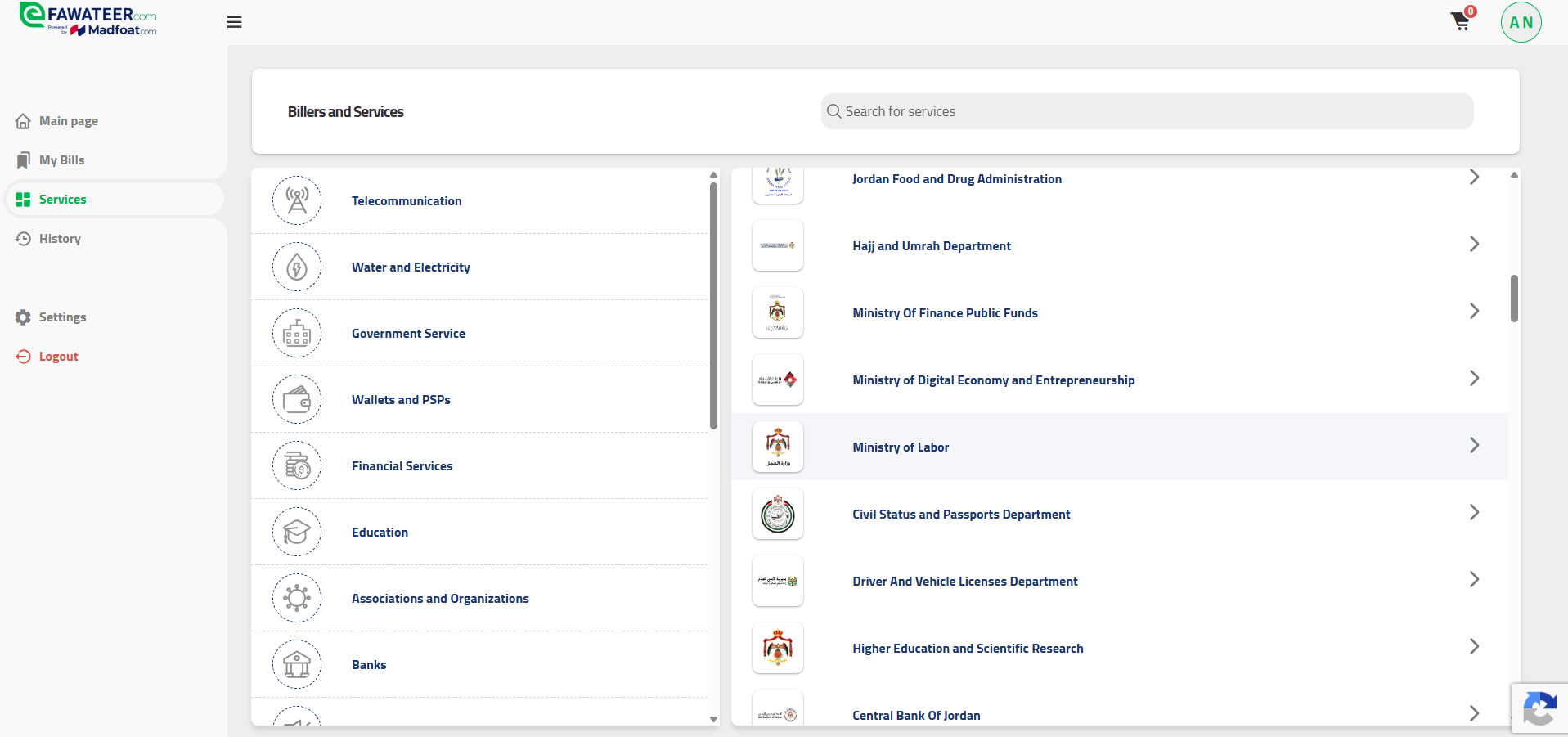
4- Choose the right service
After selecting the Ministry of Labor, you will be able to select the exact service you are paying for from a dropdown menu. It includes the following:
- eWork permit service.
- Expat labor service.
- Fees of work permit through Aqaba.
Choose the right option and enter your billing number to verify the transaction.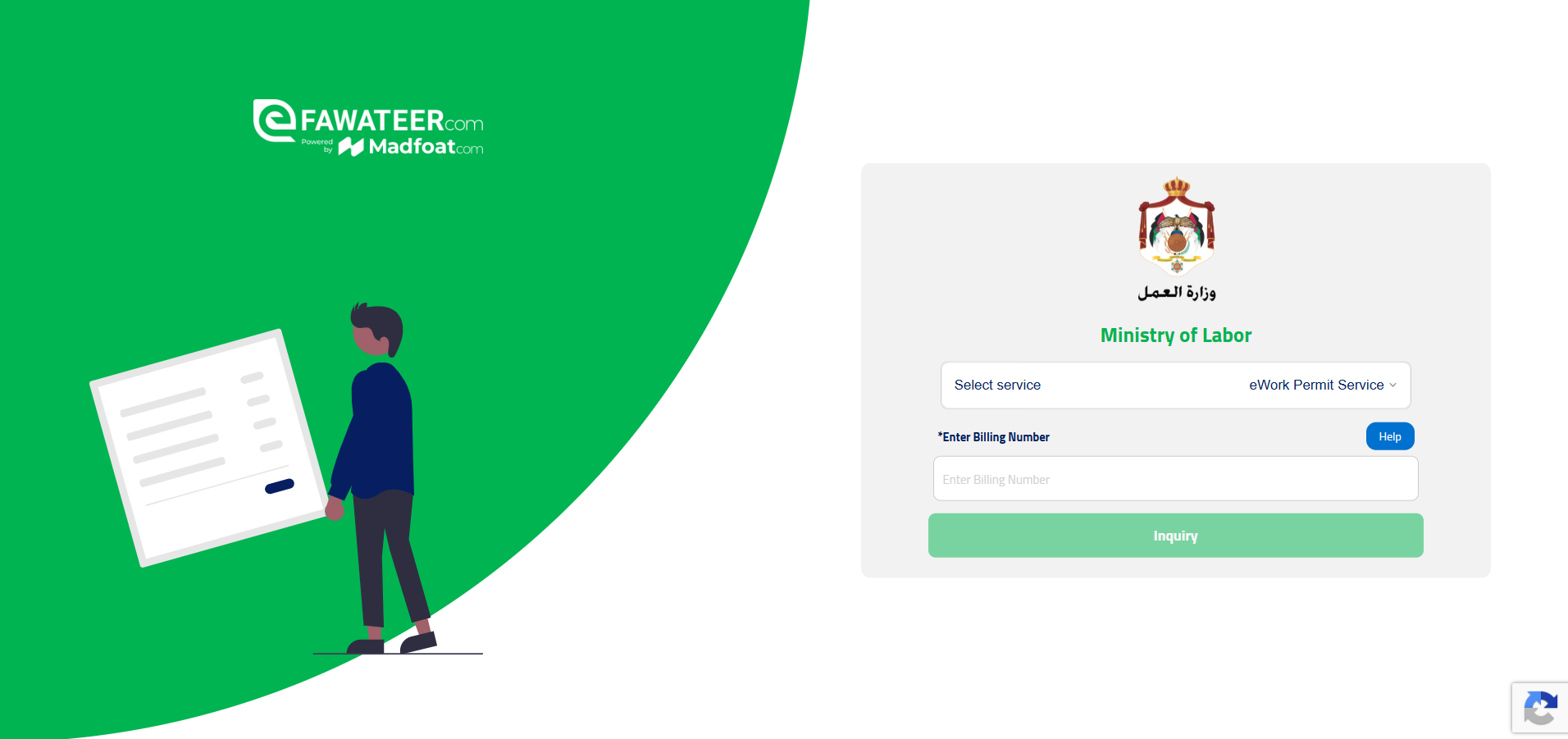
5- Select the suitable payment method
After confirming the payment’s details, choose the most suitable payment method to complete your online work permit payment. The available options include direct bank transfers, Visa or Mastercard, and PayPal.
Now, you have to enter the required financial information based on the chosen payment method. For bank transfers, you will have to provide your bank account number, IBAN, and bank name. If you are paying through your card, you need to enter the card number, the expiration date, and the CVV/CVC security code. PayPal payments, on the other hand, require your PayPal account details.
Now, the payment will be processed securely, and your online work permit payment will be completed successfully.
6- Keep a copy of the confirmation receipt
Finally, you will receive a confirmation message, assuring you that the transaction has been carried out without issues. It is recommended that you keep a copy of this digital receipt and save it for future reference, as it is considered an official proof of work permit fees payment.
How to Renew Work Permits Online in Jordan Easily and Securely
Renewing work permits in Jordan is a legally required procedure that must be completed before the document’s expiration date to avoid penalties and fines. It is best that employers begin renewal procedures during the last few months prior to expiration. You can renew work permits online in Jordan through the Ministry of Labor’s Work Permits Portal or through official and trustworthy portals like eFAWATEERcom.
That being said, there are some relevant regulations regarding work permit renewal payments that you should keep in mind, some of which are as follows:
- Grace period and fines
The Ministry of Labor handles late renewal fines in accordance with the applicable laws and regulations at the time of the actual renewal. These can vary depending on the permit type and each individual case. It is advisable to always renew work permits on time to avoid paying extra fees or carry out additional procedures.
- Where to renew your work permit
You can simply renew your work permit online through the Work Permits Portal or eFAWATEERcom’s portal as long as the renewal is for the same occupation and with the same employer. This requirement allows the application to be linked to the relevant information already stored in the system.
- Needed documents for renewal
The documents typically required for work permit renewal online include a copy of the valid business license, the worker’s valid passport, and the previous work permit. These documents help ensure that the process is completed promptly without delays.
Finally, work permit renewal payments require you to follow the same steps as paying for a new work permit on eFAWATEERcom’s platform. After choosing “Services” from the home page and then “Government Service” from the billers’ list, you select the Ministry of Labor as the service provider. Proceed with selecting the right service from the listed options before entering the billing number.
Upon doing so, the system will automatically determine whether the transaction relates to work permit renewal or payment of associated fees. After entering your financial information, the transaction is processed successfully.
Now that you have a clear overview of online work permit renewal in Jordan, what are some issues that you may encounter during the payment process?
Common Problems Users Face with Online Work Permit Fees Payment
To achieve a smooth user experience and avoid confusion during the online work permit payment process, we compiled a list of common issues that you may encounter and how you should deal with them to complete your transaction securely and confidently:
1- The work permit fee payment option is unavailable
This option may not appear altogether on the portal, which is likely due to choosing the wrong biller category or service provider. Double-check your pathway: Services, government service, Ministry of Labor, and finally the services dropdown menu.
2- Incorrect data
Entering an incorrect work permit number or billing number disrupts the flow and prevents the processing of your payment. So be sure to review all the information you put into the empty fields, so that it matches the official records.
3- Rejected online payment
In case your payment was rejected, it is best to check that your bank account has sufficient balance, your bank card is valid, and that all entered details like the card number and expiry date are correct.
4- Payment status is not updated after transaction is complete
The transaction status can take some time to be updated. What users should do in this case is wait a short while, then check the status again and retain the payment receipt for future reference.
5- Work permit expires before renewal
Additional penalties, fees, or administrative procedures may apply in such cases, making it best to apply for renewal well before the work permit expires.
FAQs about Online Work Permit Payments and Renewal
Here are some of the most frequently asked questions about online work permit payments and renewals, giving you straightforward insights into what matters most: What payment method is used in Jordan?
When settling online work permit payments in Jordan, you can use a variety of methods, including your bank account, Visa or Mastercard, PayPal account, and others.
1- What is an electronic work permit?
The electronic work permit, also known as the e-permit, is a digital document authorizing a foreign worker to work legally in a specific country.
2- Can I pay for my work permit from outside of Jordan?
Yes, you can complete your work permit payment online through credible and official portals, like eFAWATEERcom, without needing to be physically present in the country.
3- How can I check the work permit fees before making a payment?
You can check the work permit fees in Jordan through eFAWATEERcom by selecting the right service and entering the required details. After doing so, the payable amount will be displayed before proceeding with the transaction.
4- Does the application for a work permit differ based on the sector?
Yes, some procedures and requirements may vary depending on the business activity and sector. In some cases, applicants may need to provide additional documents or approvals.
5- What do I do if the amount is deducted but the payment status is not updated?
In such a scenario, it is best to save the confirmation message or receipt as proof of payment and keep checking the status of the transaction. If it remains unchanged for a long time, be sure to contact the relevant authority.
Smooth Completion through Simple Steps with eFAWATEERcom
Digital transformation in Jordan is not an abstract concept, but it is the current lived reality. Online work permit payments present a significant shift in how official requirements are now done. Instead of waiting in queues and going through traditional and routine paperwork in person, you can make the necessary payments with a few clicks, creating more time for business development and personal growth.
All you need for work permit payments online is to know the general steps of the process, have your documents ready, and complete your payment through a trusted service provider and portal for online bill payments like eFAWATEERcom.
Begin to manage and pay your bills online through our portal for quick transactions, secure payments, and ease of use.
Read now: Tax Invoice Guide: Definition, Requirements & More
More information: How to Pay Electricity Bill Online: Your Complete Step-by-Step Guide
Explore further: How to Pay Telecom Bills Online: Zain, Orange, and Umniah