
Pay Your Water Bill Online Through eFAWATEERcom: Easy Steps
Forget the hassle of paying your water bill in person. With eFAWATEERcom’s system, you can make your water bill payment online with just a few clicks, wherever you are and whenever you like.
You’ll no longer wait in queues, be restricted to working hours, or be stuck in commute. Simply use eFAWATEERcom’s portal, application, or banking apps and digital wallets, integrating eFAWATEERcom’s robust system, for safe, seamless, and instant online bill payment.
This comprehensive guide is your starting point; it covers everything you need to know about checking your water bill online in Jordan, the bill payment process step by step, and how to handle any issues that you may face along the way.
Why Pay Your Water Bill Online through eFAWATEERcom? Advantages You Cannot Miss
Wondering why you should use eFAWATEERcom to pay your water bill by phone? Not only does it save you time and effort, but it also provides you with a user-friendly, safe, and comprehensive experience that keeps you on top of your bills and prevents service interruptions.
Here is why you should pay your water bills online using eFAWATEERcom, your go-to platform for settling bills:
1. Water Bill Inquiry
You can easily check your water bill details online in Jordan through eFAWATEERcom, including the due amount, before proceeding with payment. This feature provides you with a clear overview of each bill, helping you avoid unexpected charges and errors during payment.
2. Multiple Payment Channels
You are not limited to a single way of accessing eFAWATEERcom. You can pay your water bill by phone through the payment channel that suits you best: the eFAWATEERcom app, the online portal, or any banking app or digital wallet that integrates with the system.
3. Secure Payments
All online water bill payments are processed securely through eFAWATEERcom, as the system adheres to high standards of data security. Meaning? All your personal and payment information is safe, ensuring top confidentiality, reducing the risk of online fraud, and giving you peace of mind.
Learn more about Financial Consumer Protection.
4. Pay Anytime, Anywhere
There is no need to visit utility branches and adjust your schedule according to their working hours. With eFAWATEERcom, you can pay your water bills anytime and anywhere. Whether you are at home, at work, in Jordan, or travelling abroad, all you need is a smart device connected to the internet to complete your water bill payment online through eFAWATEERcom.
5. Save Time and Effort
Stop wasting time commuting to utility branches and waiting in line, as you are a few clicks away from paying your water bills online using eFAWATEERcom. Skip the hassle of in-person visits and complete your payment effortlessly in the blink of an eye.
6. Instant Payment Confirmation
You will get a confirmation message or notification after you pay your bill, verifying that the transaction was successful. Saving this confirmation helps you keep track of your digital payments and makes it easier to verify your bill status without contacting your service provider.
So, now that you know why you should choose eFAWATEERcom for water bill payment online, how do you use the portal or app to pay the bill?
How to Pay Water Bills Online through eFAWATEERcom in Minutes
If paying through eFAWATEERcom sounds intimidating, rest assured that the process is easy and straightforward. Whether you are using eFAWATEERcom’s portal or mobile application, you can follow the below steps to complete your water bill payment online easily and smoothly:
1- Create an Account or Log in
If this is your first time using eFAWATEERcom, create an account through the app or portal. Then, log in using your credentials to access the home page, where you can find all available features and services, such as water and electricity bill payment services.
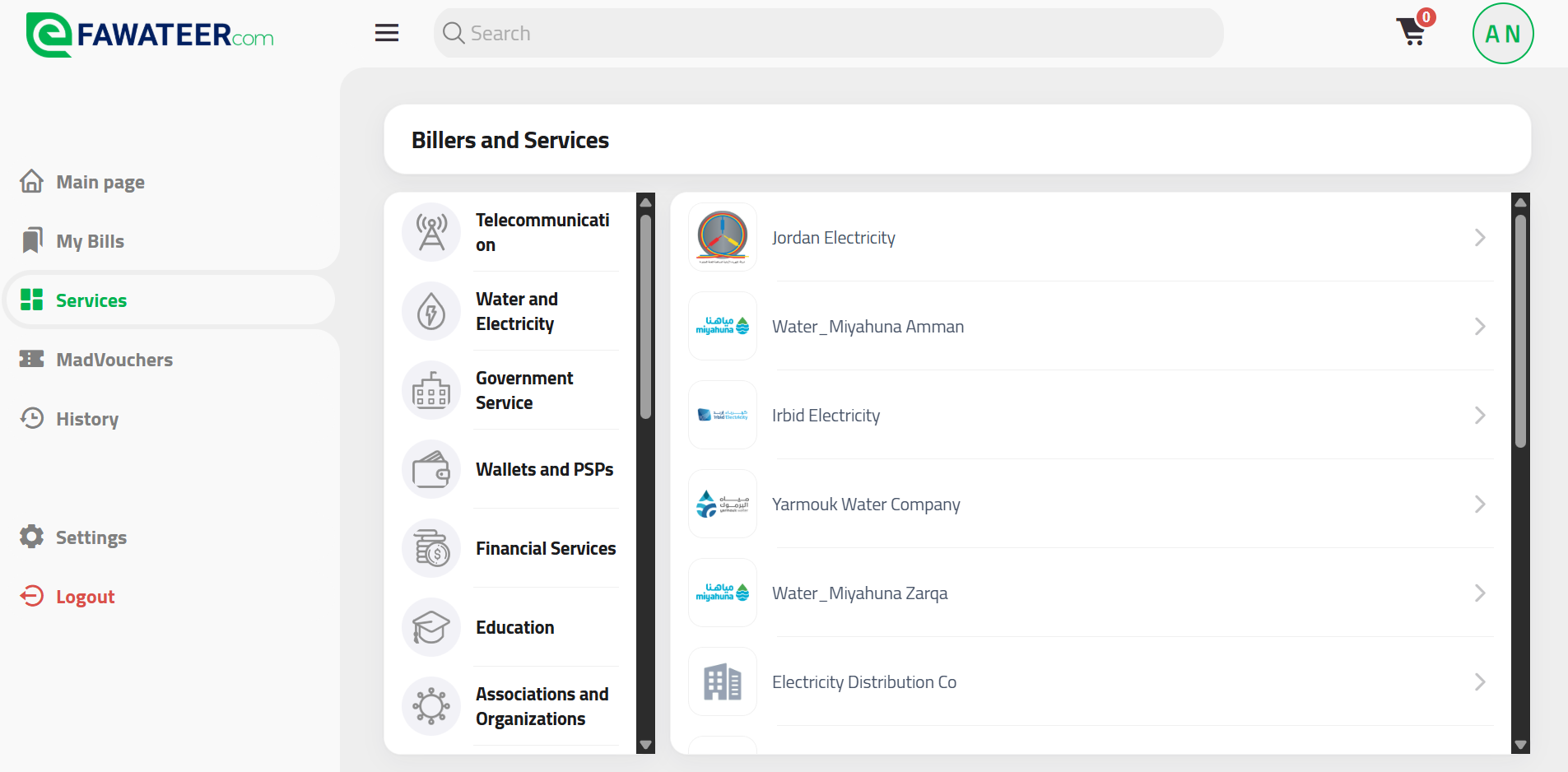
2- Go to the Services Menu
You can easily spot the Services option to the left of the home page screen. Click on it to access all bill payment services on eFAWATEERcom, categorized by biller for added convenience. From the “Billers and Services” menu, choose “Water and Electricity” to display all utility service providers.
3- Choose the Right Service Provider
Select the water company associated with your bill from the list of billers on eFAWATEERcom. Be sure to choose the service provider responsible for your area, as each water company serves specific governorates and regions. By doing so, the appropriate outstanding water bill is retrieved, and your payment is processed accurately and efficiently.
4- Select the Right Service
Each utility provider offers multiple services through eFAWATEERcom. So after selecting the correct biller, choose the service you want to pay for. You can choose “Water Bills Payment” if you want to pay your water bill online at that moment. If not, you can pick another service like Objection Fees, Sewage Claims, and others.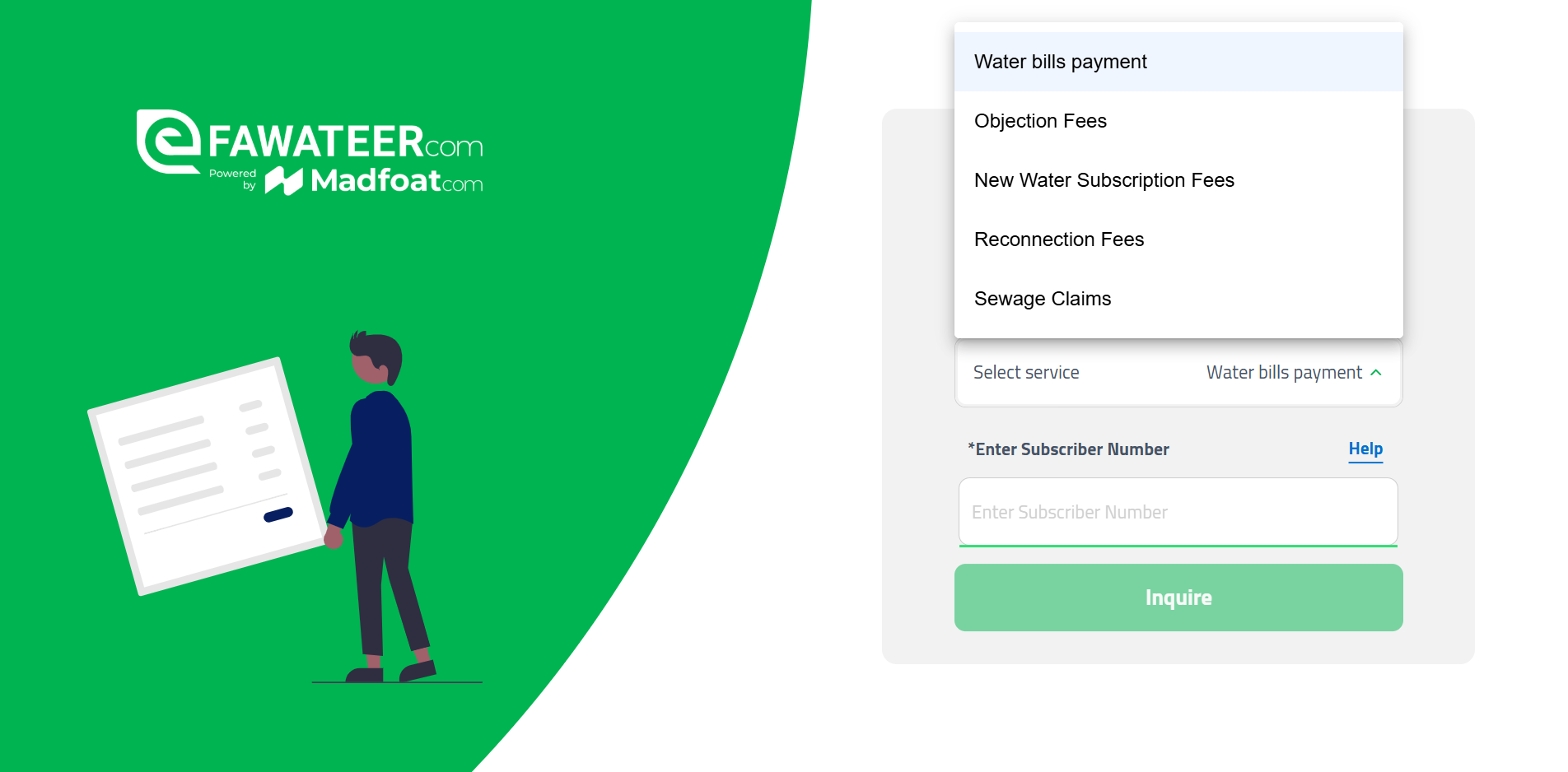
5- Enter the Subscription Number
The next step of how to pay water bills online through eFAWATEERcom is entering the subscription number. This number identifies your water subscription and links it to your chosen service. Type in the number into the designated field, and be sure to enter it correctly so you do not pay someone else’s bill or have to re-enter it later on.
6- Review Billing Details
All of your water bill details will be displayed after entering your subscription number, including the due amount and some basic information. It is important that you review these details carefully to ensure that they belong to your water subscription, not someone else’s. The amount due should also match the amount you expect to pay or the amount shown on your physical bill.
7- Choose a Payment Channel
To proceed with your water bill payment online, choose your preferred payment method from the available options. Those include bank cards, digital wallets, and PayPal. Now, fill in the empty fields with the required financial information before confirming your payment, which will be processed securely and instantly.
8- Receiving Confirmation
You will get a confirmation message or notification informing you that the transaction has been completed successfully. You can keep this receipt for future reference, helping you keep track of your digital payments and showing it as proof of payment whenever needed.
Now that you know how to pay water bills online through eFAWATEERcom, you can begin settling your bills easily and quickly and stay on top of your financial obligations. But before doing so, check the common issues you may face during payment and how to overcome them.
Common Issues When Paying Your Water Bill Online and How to Fix Them
Paying your water bills through eFAWATEERcom is a smooth process, but you may face some minor issues due to temporary glitches or unfamiliarity with some details. Here are some of these challenges and how to overcome them in simple steps:
1. Water Bill Not Showing After Entering Subscription Number
In this case, the system has identified your water subscription but is not displaying the bill itself. To resolve this, make sure that the subscription number you entered is correct. If the issue persists, the bill may not have been issued yet, or the information may not have been updated in the biller’s system. It is best to try again later or contact the water company to check your bill status.
2. Water Subscription Not Found
This is another common issue that users may face with water bill payment online, but it can be easily resolved. eFAWATEERcom retrieves your account using the subscription number registered with your water company. If your subscription cannot be found, it usually means that you entered the number incorrectly or selected the wrong water company. Double-check both before trying again.
3. Payment Failure
Transactions may occasionally fail because of insufficient balance, an expired bank card, a brief interruption to the internet connection, or a temporary glitch in the payment channel you’re using (the app or portal). Confirm that you have sufficient funds, a stable internet connection, and a valid bank card before trying again. You may want to try another payment channel if the problem remains.
4. Water Bill Status is Not Updated
The bill status can sometimes take a few minutes to be updated after payment is complete, especially during peak hours when the system can get overloaded. Wait before checking the status once again. If it is still not updated despite deducting the due amount, keep a receipt of the payment confirmation and contact the service provider or our technical team to double-check the transaction and bill status.
5. Not Receiving Confirmation
If you haven’t received the confirmation receipt or notification after paying your water bill online, check the “Payment History” section on the home page through the app or portal to verify that the payment has been recorded as “Successful.” If the amount has been deducted but the payment does not appear as a completed transaction and is still “pending,” contact customer support for assistance and provide them with the transaction details.
6. You Can’t Log In
If you cannot sign in to your account, double-check your username, phone number, and password. If you still cannot access the account, reset your password. You should also update your application or use a different browser if you’re still having trouble logging in.
FAQs about Paying Water Bills Online through eFAWATEERcom
Do you have more questions about water bill payment through eFAWATEERcom in Jordan? Here are some common questions users have and their answers:
1) Can I pay someone else’s water bill?
Yes, you can pay anyone’s water bill as long as you have their subscription number and you choose the right water company. The subscription does not have to be registered with your name.
2) Are there extra charges for paying water bills through eFAWATEERcom?
A minimal fee may apply to certain transactions completed through eFAWATEERcom, including water bill payments. These fees help cover the costs of secure, real-time payment processing and support the system's ongoing maintenance and enhancements. Click here to learn more about our fees.
3) What happens if I enter the wrong subscription number and pay the bill successfully?
If you happen to pay someone else’s bill by completing a transaction using the wrong subscription number, contact eFAWATEERcom’s support team as soon as possible to proceed with the needed procedures, and be sure to provide a copy of the receipt and the transaction’s number.
4) Can I download or print my payment receipt?
Yes, eFAWATEERcom’s payment channels allow you to display the receipt, download it, and print it, helping you keep track of your digital payments.
5) Can I access my previously paid bills?
Yes, you can check your previously paid bills through eFAWATEERcom from the “Payment History” section on the home page.
Pay Your Water Bill Online from the Comfort of Your Home
Spend only a few minutes paying your water bill with eFAWATEERcom. Save time and effort for the things that matter, rather than giving them away to monthly dues and financial obligations. All you need to do to pay your water bills online through eFAWATEERcom is to create an account on the app or portal and follow a few simple steps to complete the transaction with just a few clicks.
eFAWATEERcom is your go-to option for online bill payment and management thanks to its world-class security technologies and robust features, offering you a secure and efficient payment experience.
Pay your bills on time anywhere and anytime to avoid late payment fees and ensure uninterrupted service.
Read now: How to Pay Electricity Bill Online: Your Complete Step-by-Step Guide
More information: How to Pay for Work Permit Online in Jordan: Step-by-Step Guide