
How to Pay Property Tax Online in Jordan: Everything You Need to Know
Do you always put off paying your property tax? Maybe it’s because you don’t want to be stuck in traffic or wait in a long queue for your turn. With eFAWATEERcom, you won’t have to deal with either anymore! You can pay property tax online whenever you want and wherever you are in just a few easy steps, using eFAWATEERcom’s portal or mobile application.
Wondering how to pay property tax online in Jordan? Unsure of how to use eFAWATEERcom for this procedure? Our guide walks you through the steps of online property tax payment through eFAWATEERcom and provides you with further valuable insights like the potential challenges you may face and how to resolve them.
What is Property Tax in Jordan?
Property tax is imposed on properties like apartments, houses, and commercial shops in Jordan, as well as plots of land where applicable. It is one of the taxes associated with owning property in the country and is also referred to as the Building and Land Tax.
How is property tax in Jordan calculated?
As for the amount due, it is calculated based on the property’s registered details, type, and assessed value, as determined by the relevant government authorities.
Who has to pay property taxes?
Property owners are responsible for paying property taxes on taxable buildings and land located in areas covered by applicable tax regulations. Payment can be made either online or in person through conventional channels, within the specified deadlines.
That being said, you can make property tax online payments through eFAWATEERcom and settle your tax on time effortlessly and easily. Below is a detailed breakdown of this process.
How to Pay Property Tax Online in Jordan? Step by Step
Paying your property tax electronically is a quick and convenient way to meet your tax obligations. With eFAWATEERcom’s secure and reliable bill payment system, you can complete your property tax payment online in just a few minutes without needing to take time off work, worry about traffic, or wait in long lines.
Here is how to pay property tax online in Jordan using eFAWATEERcom, anytime and anywhere:
1- Sign into Your Account
Begin by accessing eFAWATEERcom’s portal and logging into your account. If this is your first time using it, create a new account by filling out the mandatory fields with your personal information before signing in.
Alternatively, you can use the mobile application on the App Store or Google Play and follow the same instructions.
2- Access the “Services” Section
From the home page, select the “Services” option located to the left to access eFAWATEERcom’s comprehensive list of service providers and billers. You can easily view the companies, vendors, and government authorities whose bills you can pay through the system.
3- Choose “Government Service”
Now, select “Government Service” from the list on the left to display all official government authorities registered with eFAWATEERcom, allowing you to pay all of your government-related fees, bills, taxes, and other financial obligations online.
4- Select “Amman Municipality”
Select “Amman Municipality” from the list of government service providers to proceed with property tax payment online through eFAWATEERcom. Upon selection, you will find a list of fees and taxes you can enquire about and pay off using the system.
5- Choose the Relevant Tax Option
Next, to pay property tax online through eFAWATEERcom, choose the relevant property tax option from the dropdown menu. You will find several options, including Total Current Buildings and Plots Tax, Total Previous Buildings and Plots Tax, and Previous and Current Property Tax, in addition to other types of fees and dues. 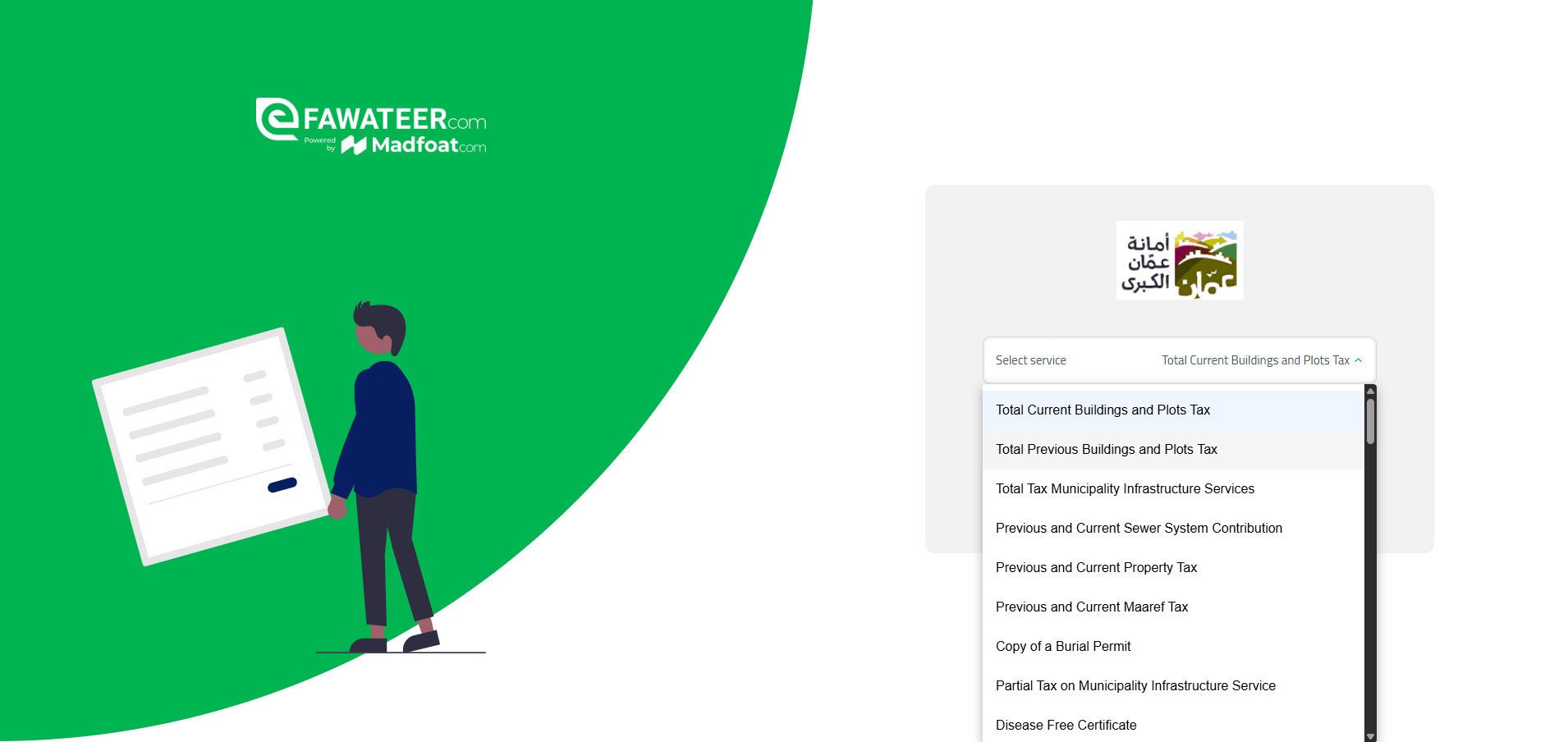
6- Enter the e-Payment Number
Type in the electronic payment number in the designated field and double-check it to ensure it is entered correctly. Then, click on “Inquire” to check the due amount before the actual payment step.
7- Select a Payment Method and Complete the Transaction
eFAWATEERcom provides a variety of payment methods, so choose the one that’s most suitable for you to pay your property tax online. Enter the needed details, verify that the displayed amount and personal information are correct, and complete the transaction.
8- Receive a Confirmation Receipt
Once the payment is processed, you will receive a transaction confirmation. You will also receive an electronic receipt to keep as proof of payment for future reference.
These are the exact steps of how to pay property tax online in Jordan through eFAWATEERcom, helping you fulfill your financial obligations easily, smoothly, and securely.
Requirements of Online Property Tax Payment through eFAWATEERcom
To pay property tax online through eFAWATEERcom, you will need to provide the e-payment number dedicated to your property. It is required to display the due amount and all relevant information on the portal or app.
It is worth mentioning that you do not need to know the tax amount in advance, as it will be displayed on the system right after you enter the e-payment number and select the proper tax option.
Potential Challenges When Paying Property Tax Online & How to Address Them
While online property tax payment through eFAWATEERcom is an easy and straightforward process, you may run into some minor issues. Here are the potential challenges that may arise and how to effectively resolve them:
1) Bill is not showing
The bill may not show up after entering your e-payment number. In this case, verify that the number you entered is correct and that you specifically selected Amman Municipality from the billers list. Then, try again. If the issue persists, it is best to contact the relevant tax authorities to double-check your tax information.
2) The e-payment number is incorrect
A message might appear informing you that the e-payment number is incorrect. Make sure that you entered the number correctly and selected the proper tax option from the list of available services. The e-payment number and the service type must align for the transaction to proceed.
3) The transaction is pending, and the amount has not been deducted
If you paid your tax but the amount hasn’t been deducted, the transaction may still be processing or is temporarily “stuck.” Do not make another payment. Instead, wait a little and then check that the amount was deducted, you received a confirmation, and the bill status shows “successful” on the system.
If the transaction remains incomplete, contact eFAWATEERcom’s team for technical assistance.
4) Amount is deducted but bill status is not updated
If the amount has been deducted successfully, your bill status should be updated to “successful” in the “Payment History” section on the home page. However, if the status is not changed from “pending” to “successful,” you should wait a little while before checking the status again.
If it remains under the pending status, you should contact the relevant authority or eFAWATEERcom’s support team and provide them with the transaction receipt to proceed with the needed action.
5) Payment failure
If the payment is unsuccessful, ensure that the payment method you’re using is valid (bank card is valid, for instance) and that the information you entered is correct before trying again. If the payment is still unsuccessful, it is best to try another payment method or contact the support team to identify the cause of the issue.
Generally speaking, you should contact eFAWATEERcom’s team if the issue has something to do with the payment itself. But if the problem is related to property information and tax details, get in touch with Amman Municipality for proper support. Always keep a copy of the confirmation receipt, as it can help resolve issues more promptly.
You can submit a complaint through eFAWATEERcom’s website as well. Our team will get back to you as soon as possible.
FAQs about Paying Property Tax Online
Below are some of the most common questions about property tax online payment:
1. Who collects property tax in Jordan?
Property tax in Jordan, or the Buildings and Land Tax, is collected by Greater Amman Municipality or the relevant municipalities in other governorates. In other words, the relevant authority depends on the location of the taxable property.
2. Who pays the property tax, the tenant or the property owner?
The property tax is imposed on the property owner or the person legally liable for the property, depending on the applicable rules and regulations.
3. What happens if I don’t pay my property tax?
The outstanding tax remains a financial obligation that you must pay off, and you may have to pay additional fees because of late payment, as determined by applicable rules. So it is best you settle your property tax on time.
4. How much is property tax in Jordan?
The property tax in Jordan is not charged as a fixed amount, since it depends on the property type and its assessed value.
5. Can I dispute my property tax?
Yes, there are official legal procedures for appealing the property tax assessment or the tax itself through the relevant authority. These processes vary depending on the type of dispute and taxable property.
Pay Your Property Tax Online Today without Compromising Your Comfort
Do not waste time and effort on in-person bills and tax payments when you can settle your financial dues electronically. Using a secure and reliable electronic payment system is more than enough to get the job done.
With eFAWATEERcom, you can complete your property tax payment online in a few simple steps without compromising your comfort. You don’t need to take a leave from work or disturb your morning routine, as you can check and pay your taxes from anywhere and anytime.
Access eFAWATEERcom’s portal or mobile app now on the App Store or Google Play and pay property tax online in just a few moments.
Learn more: Pay Your Water Bill Online Through eFAWATEERcom: Easy Steps
Further reading: How to Pay for Work Permit Online in Jordan: Step-by-Step Guide